

Play, mod and host. One small app.

Velocity is a free Minecraft launcher for Windows. It keeps your instances and mods tidy, installs content from Modrinth and CurseForge, and runs servers for your friends with a public address. It needs no setup and opens in about a second.

Version 0.1.0 · Windows 10 and 11 · 5 MB · Minecraft 26.3

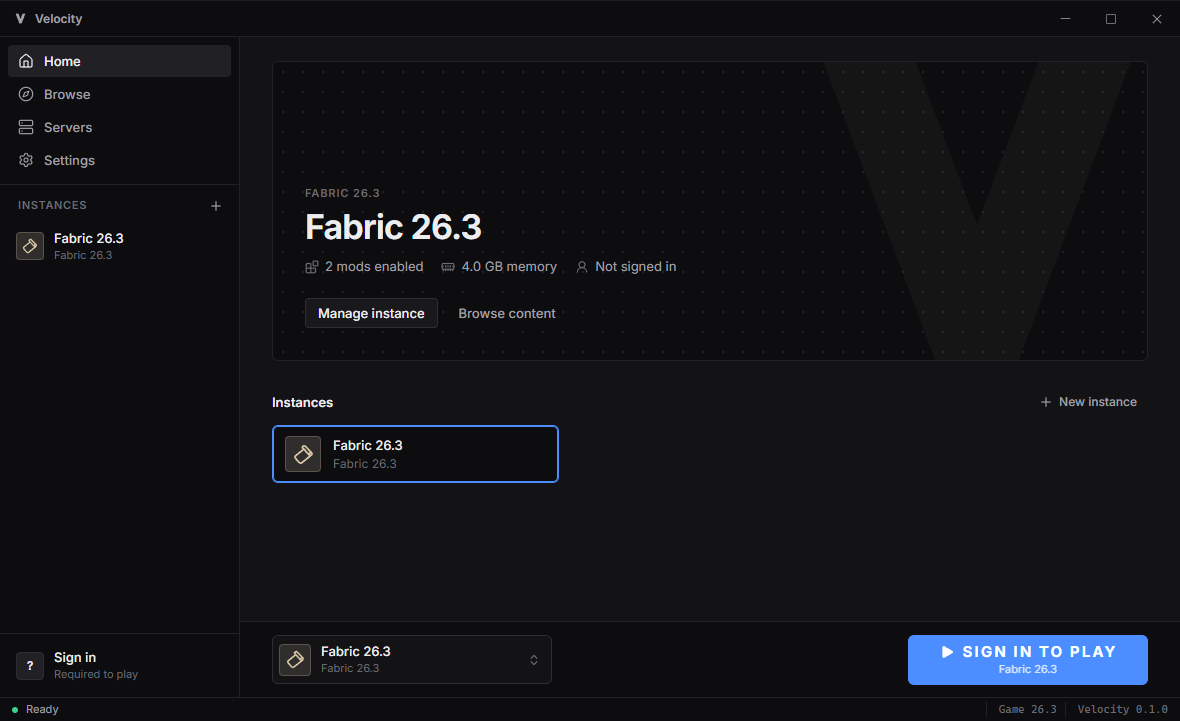
Velocity's home screen: a Fabric 26.3 instance with 2 mods enabled, the instance list and a large play button

Everything a launcher should do, and nothing it shouldn't

No news feed, no ads, no account with us. You open it, pick an instance and press play.

Instances

Keep separate setups side by side, each with its own folder, mods, icon and loader. Vanilla, Fabric, Quilt, Forge and NeoForge are all supported, and each instance installs its loader for you on first launch.

Fast and small

Velocity is written in Rust and is a 5 MB download. Game files download in parallel and are checked against Mojang's hashes, so a second launch only checks what's already there. If you don't have Java 25, it downloads Temurin for you.

Microsoft sign-in

Sign in with the Microsoft account that owns Minecraft. You type a short code on Microsoft's own page, so Velocity never sees your password. Your sign-in is saved in Windows Credential Manager, not in a plain file.

Built to stay out of your way

A clean, dark interface with a play button, your instances and a status bar that shows what's happening. You can have the launcher minimize itself when the game starts. Logs for every launch are one click away.

Mods, resource packs and shaders

Search Modrinth and CurseForge from inside the launcher and add things to an instance with one click. Velocity downloads the right file for 26.3 and your loader, adds any required dependencies, and removes files you turn off. Your own files in the folder are left alone.

Download for free
  • Modrinth: mods, resource packs and shader packs, no setup needed
  • CurseForge: the same, with your own free CurseForge API key
  • Required dependencies installed automatically
  • Turn any mod off without deleting it
  • Open the instance folder from the launcher

Host a server without leaving the launcher

Create a server, pick the software, press Start. Velocity downloads the server, accepts the EULA once you agree to it, and gives you an address your friends can join.

A public address

Velocity can open your router's port with UPnP so friends join on your real IP. If your router or internet provider doesn't allow that, turn on the tunnel and get a public address from bore.pub instead. It works behind CGNAT too.

Every setting

Every option in server.properties, grouped and explained: players and access, gameplay, world, server list, resource pack, network and performance. Manage the whitelist, operators and bans from the Players tab.

A live console

See the server log as it happens and type commands straight into it. Stop shuts the server down cleanly, and Force stops it if it hangs.

Tuned for you

Set the memory, add your own JVM flags or turn on Aikar's flags, and have the server restart on its own if it crashes. New servers start with the whitelist off, so friends don't get "You are not whitelisted".

All the server software

Velocity uses the official download for each one. Some don't have a 26.3 build yet; they'll turn on when they do.

Vanilla

  • Vanilla Mojang

Plugins

  • Paper
  • Purpur
  • Folia Alpha
  • Leaf Experimental
  • Spigot Built from source
  • Sponge RC
  • Pufferfish No 26.3 yet

Mods

  • Fabric
  • Quilt Beta
  • Forge
  • NeoForge

Hybrid

  • Mohist No 26.3 yet
  • Arclight No 26.3 yet

Proxies

  • Velocity PaperMC
  • BungeeCord

Download Velocity

One file, no installer. Put it anywhere and open it.

Velocity 0.1.0

First release · Minecraft 26.3

Latest

Windows 10 and 11 (64-bit)

Portable app, 5 MB. Needs Microsoft Edge WebView2, which Windows already includes.

Velocity.exe Download

Good to know

  • The app isn't code-signed yet, so Windows SmartScreen may warn you the first time. Click More info, then Run anyway.
  • macOS and Linux versions aren't available yet.

SHA-256: 81B20EC23B7CB59D24C0F1670271BF76A7F5E25BF6D540E279D423C4474A99E9

What Velocity connects to

Velocity has no analytics and no Northwire account. It only talks to the services it needs for what you're doing.

ServiceWhen
Microsoft, Xbox Live and Minecraft servicesWhen you sign in and when you start the game
Mojang (piston-meta, libraries, resources)When game files need downloading or checking
Modrinth and CurseForgeWhen you browse content or launch an instance that has some
AdoptiumOnly if you don't have Java 25
PaperMC, Purpur, Fabric and other server software sitesWhen you start a server that needs downloading
Your router (UPnP)Only when you turn on a public address
bore.pubOnly while the tunnel is on

Your instances, servers and settings stay on your PC, in %APPDATA%\com.velocity.launcher. See the Northwire privacy policy for the rest.

Questions

Is Velocity free?

Yes. No paid tiers and no ads, like everything Northwire makes.

Do I need to own Minecraft?

Yes. Velocity launches the official game, so you sign in with the Microsoft account that bought Minecraft: Java Edition. It doesn't work around the license check.

Why only Minecraft 26.3?

We're starting with the latest version and making it work well before adding others. Older versions will come in a later update.

Sign-in says the app isn't approved. What do I do?

Microsoft has to approve every launcher before it can sign players in to Minecraft. Until Velocity's approval comes through, the sign-in window shows how to use your own Azure app ID, or you can start the game from the official Minecraft Launcher instead.

Can my friends join my server from anywhere?

Yes. Turn on a public address in the server's page. UPnP gives you your real IP if your router allows it. If it doesn't, or your internet provider uses CGNAT, the tunnel gives you a bore.pub address that works anyway.

Do I need a CurseForge key?

Only to browse CurseForge. Modrinth works right away. You can get a free key from the CurseForge for Studios console and paste it in Settings.

Is this the same as PaperMC's Velocity proxy?

No. This Velocity is a launcher made by Northwire. PaperMC's Velocity is a server proxy, and you can run it from the launcher's Servers page.

Where are my files?

In %APPDATA%\com.velocity.launcher. Each instance and each server has its own folder, and both have an Open folder button in the launcher.

Ready to play?

Download Velocity, create an instance and press play.